> ## Documentation Index
> Fetch the complete documentation index at: https://docs.labelbox.com/llms.txt
> Use this file to discover all available pages before exploring further.
# Similarity search with embeddings
> Learn how to use embeddings to perform a similarity search in Labelbox.
Embeddings are numerical representations of your data that make it possible to find items that are visually or contextually similar. This is especially useful for unstructured data like images, text, and video, where you can't use traditional search methods. In Labelbox, this is called a similarity search.
By using similarity search, you can quickly find more examples of rare edge cases, identify and remove bad data, and ultimately build a higher-quality dataset for training your models.
## How to use similarity search
The easiest way to get started with similarity search is to use the *pre-computed embeddings* that Labelbox provides for common data types.
**To perform a similarity search:**
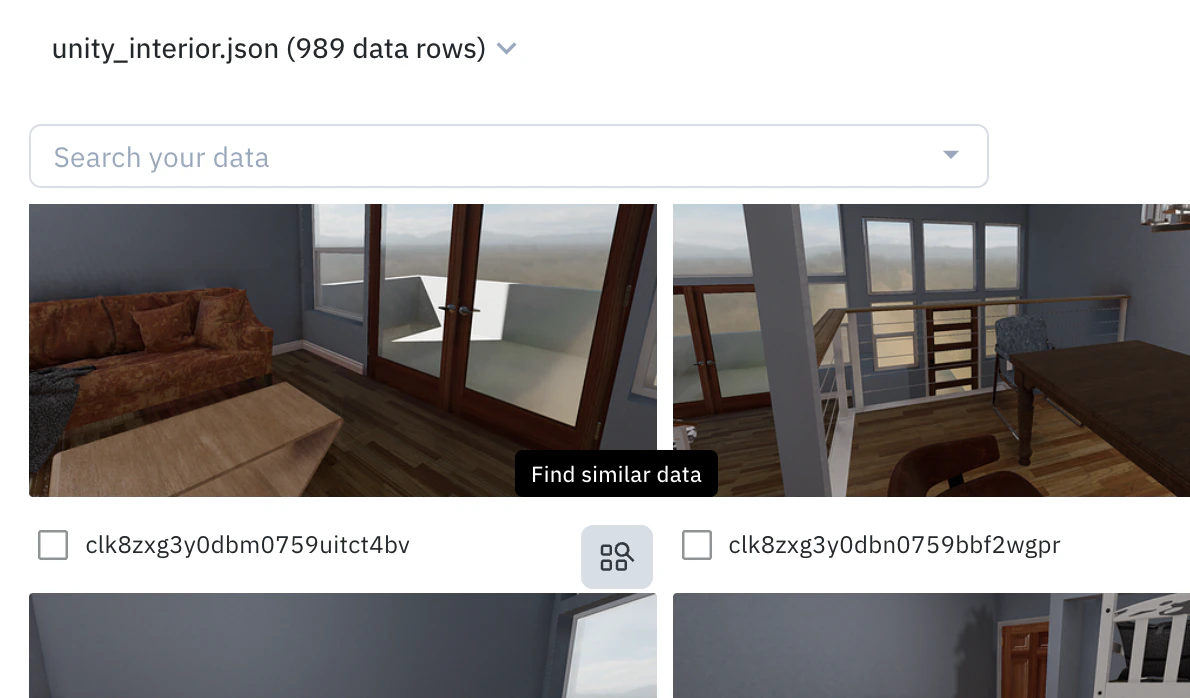
1. **Find an anchor**: In the Catalog, hover over a data row you want to find more examples of and click the **Find similar data** icon. This initial data row will be your "anchor".
 2. **Add more anchors**: You can optionally select multiple data rows to use as anchors and then select **Add selection as anchors**.
3. **Refine your results**:
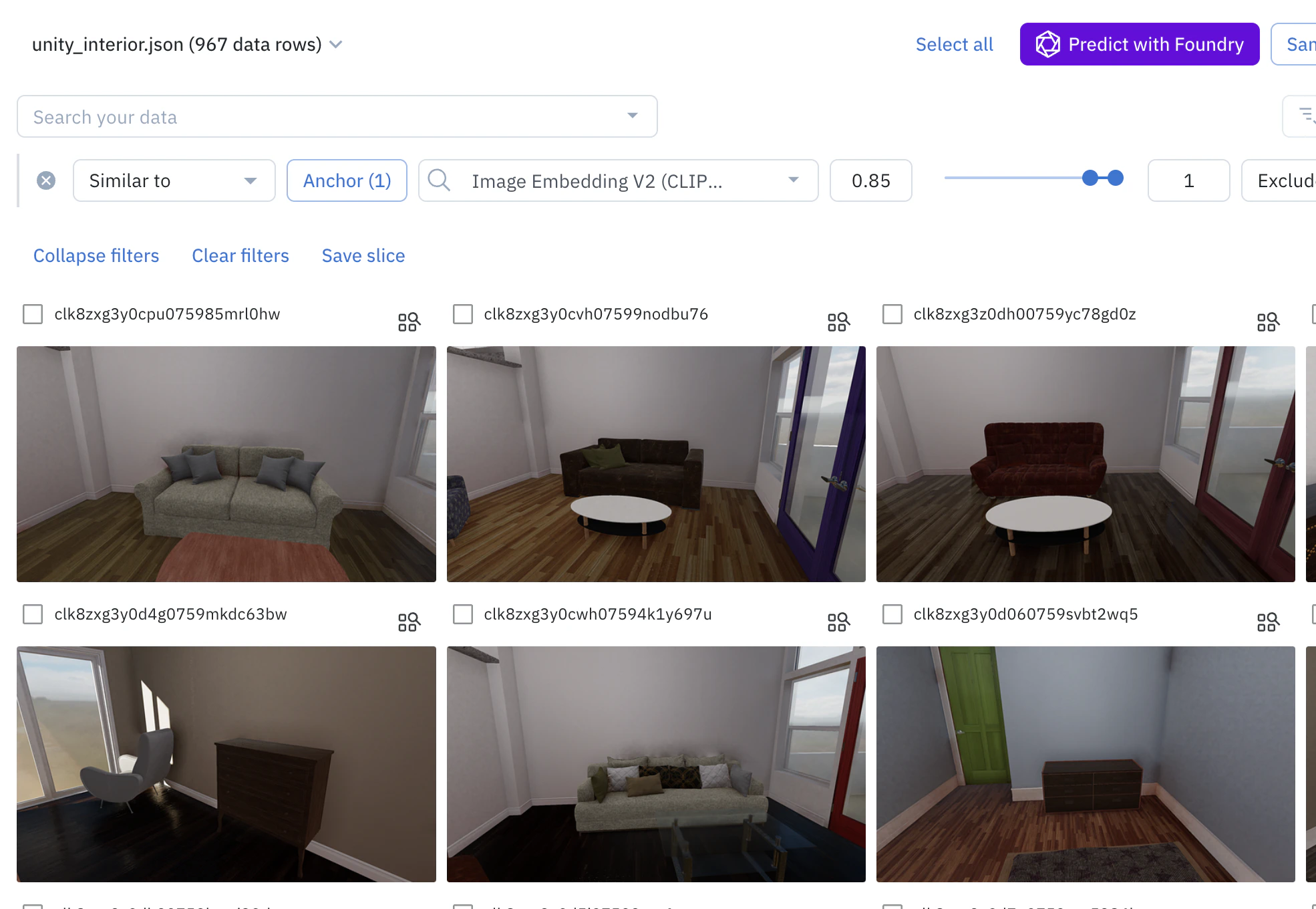
* **Add or remove anchors**: To add more examples and refine the search, select more data rows and click "Add selection to anchors". To remove an anchor, click on "Anchors (n)" to view all anchors, and click the "—" icon on the one you want to remove.
* **Adjust the similarity score**: You can adjust the range of the similarity score (from 0 to 1) to broaden or narrow your search. A higher score means the results will be more similar to your anchors.
2. **Add more anchors**: You can optionally select multiple data rows to use as anchors and then select **Add selection as anchors**.
3. **Refine your results**:
* **Add or remove anchors**: To add more examples and refine the search, select more data rows and click "Add selection to anchors". To remove an anchor, click on "Anchors (n)" to view all anchors, and click the "—" icon on the one you want to remove.
* **Adjust the similarity score**: You can adjust the range of the similarity score (from 0 to 1) to broaden or narrow your search. A higher score means the results will be more similar to your anchors.
 | Asset type | Pre-computed embedding |
| -------------- | ----------------------------------------------------------------------------------------------------------------------------------------------------------------------------------------------------------------- |
| Image | [CLIP-ViT-B-32](https://huggingface.co/sentence-transformers/clip-ViT-B-32) (512 dimensions) |
| Video | [Google Gemini Pro Vision](https://ai.google.dev/gemini-api/docs/models). First two (2) minutes of content is embedded. Audio signal is not used currently. This is a paid add-on feature available upon request. |
| Text | [all-mpnet-base-v2](https://huggingface.co/sentence-transformers/all-mpnet-base-v2) (768 dimensions) |
| HTML | [all-mpnet-base-v2](https://huggingface.co/sentence-transformers/all-mpnet-base-v2) (768 dimensions) |
| Document | [CLIP-ViT-B-32](https://huggingface.co/sentence-transformers/clip-ViT-B-32) (512 dimensions) and [all-mpnet-base-v2](https://huggingface.co/sentence-transformers/all-mpnet-base-v2) (768 dimensions) |
| Tiled imagery | [CLIP-ViT-B-32](https://huggingface.co/sentence-transformers/clip-ViT-B-32) (512 dimensions) |
| Audio | [all-mpnet-base-v2](https://huggingface.co/sentence-transformers/all-mpnet-base-v2) (768 dimensions). Audio is transcribed to text. |
| Conversational | [all-mpnet-base-v2](https://huggingface.co/sentence-transformers/all-mpnet-base-v2) (768 dimensions) |
## How to use your own embeddings
If you have your own embeddings, you can upload them to Labelbox to use in similarity searches.
View the [limits](https://docs.labelbox.com/docs/limits) page to learn the custom embedding limits per workspace and the maximum dimensions allowed per custom embedding.
**To create and upload a custom embedding:**
1. Create an [API key](https://docs.labelbox.com/reference/create-api-key).
2. Navigate to **Schema > Embeddings**.
3. Click **+ Create** and give your embedding a name and specify the number of dimensions.
4. Once created, you can use this [Google Colab notebook](https://colab.research.google.com/drive/159lWZzY3wtGacLjwfPuiqdz7eaQ8TfXj?usp=sharing) to upload your custom embeddings. You can view all of the embedding fields in JSON format by clicking the **\** button.
To delete a custom embedding, you can do so from the same **Schema > Embeddings** page by selecting the embedding and clicking the gear icon.
To learn more about custom embeddings, see our [Custom embeddings developer guide](/reference/custom-embeddings).
## Advanced search techniques
To further refine your data curation workflow, you can combine a similarity search with other filters in the Catalog, such as metadata, annotations, or datasets. Once you have a set of filters that you want to reuse, you can save them as a "slice". Slices are dynamic, so any new data that matches your filter criteria will automatically be added to the slice.
| Asset type | Pre-computed embedding |
| -------------- | ----------------------------------------------------------------------------------------------------------------------------------------------------------------------------------------------------------------- |
| Image | [CLIP-ViT-B-32](https://huggingface.co/sentence-transformers/clip-ViT-B-32) (512 dimensions) |
| Video | [Google Gemini Pro Vision](https://ai.google.dev/gemini-api/docs/models). First two (2) minutes of content is embedded. Audio signal is not used currently. This is a paid add-on feature available upon request. |
| Text | [all-mpnet-base-v2](https://huggingface.co/sentence-transformers/all-mpnet-base-v2) (768 dimensions) |
| HTML | [all-mpnet-base-v2](https://huggingface.co/sentence-transformers/all-mpnet-base-v2) (768 dimensions) |
| Document | [CLIP-ViT-B-32](https://huggingface.co/sentence-transformers/clip-ViT-B-32) (512 dimensions) and [all-mpnet-base-v2](https://huggingface.co/sentence-transformers/all-mpnet-base-v2) (768 dimensions) |
| Tiled imagery | [CLIP-ViT-B-32](https://huggingface.co/sentence-transformers/clip-ViT-B-32) (512 dimensions) |
| Audio | [all-mpnet-base-v2](https://huggingface.co/sentence-transformers/all-mpnet-base-v2) (768 dimensions). Audio is transcribed to text. |
| Conversational | [all-mpnet-base-v2](https://huggingface.co/sentence-transformers/all-mpnet-base-v2) (768 dimensions) |
## How to use your own embeddings
If you have your own embeddings, you can upload them to Labelbox to use in similarity searches.
View the [limits](https://docs.labelbox.com/docs/limits) page to learn the custom embedding limits per workspace and the maximum dimensions allowed per custom embedding.
**To create and upload a custom embedding:**
1. Create an [API key](https://docs.labelbox.com/reference/create-api-key).
2. Navigate to **Schema > Embeddings**.
3. Click **+ Create** and give your embedding a name and specify the number of dimensions.
4. Once created, you can use this [Google Colab notebook](https://colab.research.google.com/drive/159lWZzY3wtGacLjwfPuiqdz7eaQ8TfXj?usp=sharing) to upload your custom embeddings. You can view all of the embedding fields in JSON format by clicking the **\** button.
To delete a custom embedding, you can do so from the same **Schema > Embeddings** page by selecting the embedding and clicking the gear icon.
To learn more about custom embeddings, see our [Custom embeddings developer guide](/reference/custom-embeddings).
## Advanced search techniques
To further refine your data curation workflow, you can combine a similarity search with other filters in the Catalog, such as metadata, annotations, or datasets. Once you have a set of filters that you want to reuse, you can save them as a "slice". Slices are dynamic, so any new data that matches your filter criteria will automatically be added to the slice.