> ## Documentation Index
> Fetch the complete documentation index at: https://docs.labelbox.com/llms.txt
> Use this file to discover all available pages before exploring further.
# Hotkeys
> Intuitive shortcuts to help you complete your labeling tasks faster.
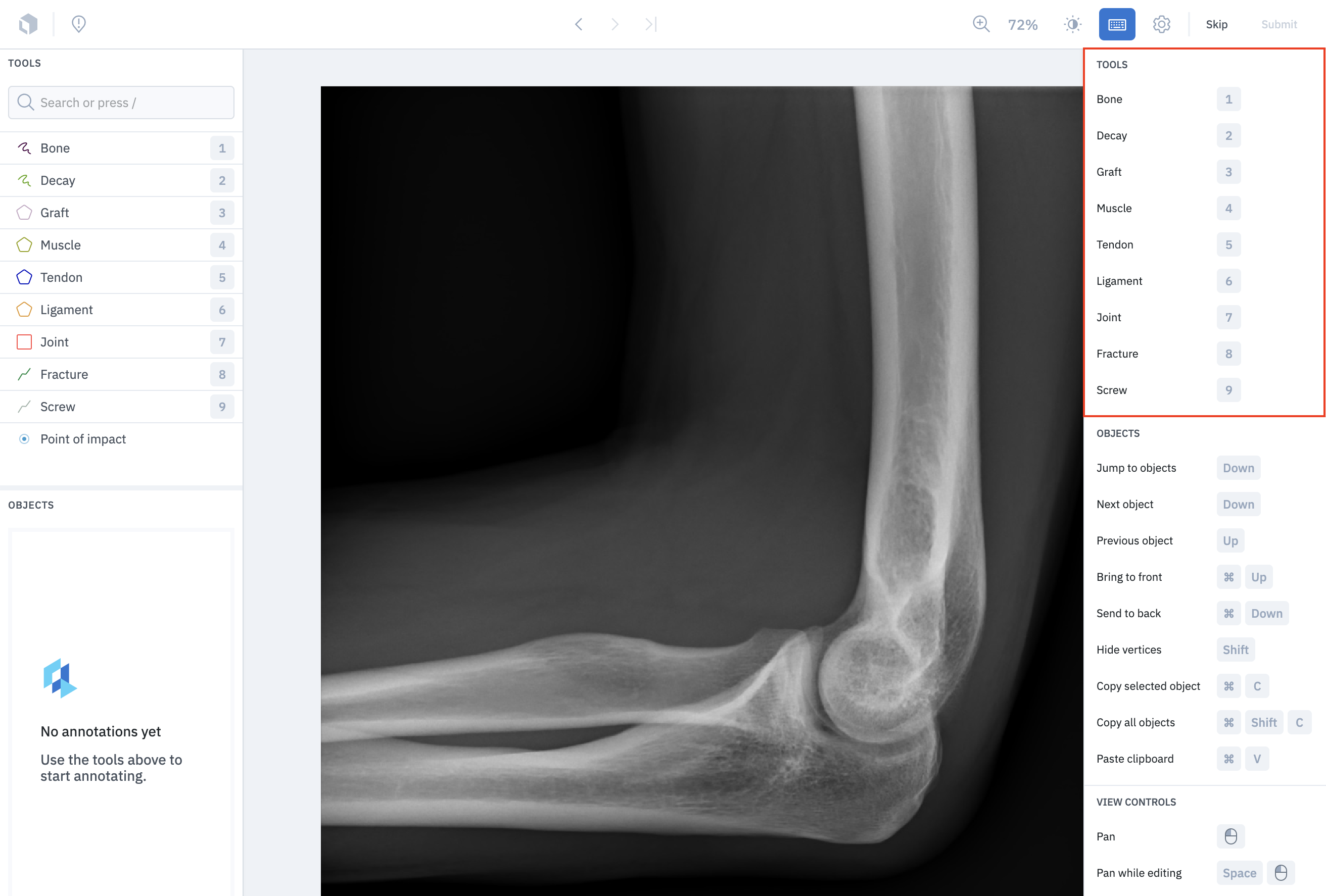
## Most used annotations
We recommend putting your most-used features at the top of your ontology. That way you can use the dedicated tool hotkeys to label the first 9 objects in your ontology.
 ## Objects
| Function | Hotkey | Description |
| -------------------- | ---------------------------- | --------------------------------------------------------------------- |
| Jump to objects | `Down` | Select the *next* object in the **Objects** panel. |
| Next object | `Down` | Select the *next* object in the **Objects** panel (same as above). |
| Previous object | `Up` | Select the *previous* object in the **Objects** panel. |
| Bring to front | `Cmd`/`Ctrl` + `Up` | Bring the annotation to the foreground. |
| Send to back | `Cmd`/`Ctrl` + `Down` | Send the annotation toward the background. |
| Hide vertices | `Shift` | Hide the vertices on a polygon or polyline object. |
| Copy selected object | `Cmd`/`Ctrl` + `C` | Copy the selected object. |
| Copy all objects | `Cmd`/`Ctrl` + `Shift` + `C` | Copy all objects in the current view. |
| Paste clipboard | `Cmd`/`Ctrl` + `V` | Paste the contents copied to the clipboard (one or multiple objects). |
## View controls
| Function | Hotkey | Description |
| -------------------- | ---------------------------- | ------------------------------------------------------------------------------------------------------------- |
| Pan | Click + Drag | "Grab" the image and reposition it on the Editor stage. |
| Pan while editing | `Space` + Click + Drag | "Grab" the image and reposition it on the Editor stage while you are in the middle of creating an annotation. |
| Zoom in | `Z` + Click | Zoom into the image. |
| Zoom out | `Option`/`Alt` + `Z` + Click | Zoom out of the image. |
| Zoom to fit | `Shift` + `Z` | Automatically adjust the zoom level so the image fits centered on the Editor stage. |
| Zoom to 100% | `Shift` + `0` | Returns the view of the image to 100% zoom level. |
| Increase brightness | `=` | Increase the brightness of the image in the Editor stage. |
| Decrease brightness | `-` | Decrease the brightness of the image in the Editor stage. |
| Increase contrast | `Shift` + `+` | Increase the contrast of the image in the Editor stage. |
| Decrease contrast | `Shift` + `_` | Decrease the contrast of the image in the Editor stage. |
| Increase opacity | `[` | Increase the opacity of the image in the Editor stage. |
| Decrease opacity | `]` | Decrease the opacity of the image in the Editor stage. |
| Toggle object titles | `.` | Show the annotation names over each annotation on the image |
| Toggle annotations | `Shift` + `S` | Hold to hide all other annotations on the image other than the one you have selected. |
## Drawing tools
| Function | Hotkey | Description |
| ----------------------------- | ---------------------------- | --------------------------------------------------------------------------------------------------------------------------------------------------------------------- |
| Pen tool | `P` | Select the pen tool for drawing a segmentation mask free hand or point by point. |
| Brush tool | `B` | Select the brush tool. |
| Auto segment: Box | `R` | Select box mode for using [AutoSegment 2.0](/docs/image-editor#autosegment-20-powered-by-metas-sam), powered by Meta's SAM. |
| Auto segment: Hover and click | `T` | Select hover and click mode for using [AutoSegment 2.0](/docs/image-editor#autosegment-20-powered-by-metas-sam), powered by Meta's SAM. |
| Fill tool | `I` | Use this tool to segment all other pixels in the image that have not yet been segmented. Useful for labeling backgrounds. |
| Erase mode | `Opt` | Switch the selected drawing tool to erase mode. |
| Draw over existing objects | `D` | Draw over existing segmentation masks with the selected pen tool. When active, the mask being drawn will claim the selected pixels that belonged to an existing mask. |
| Undo | `Cmd`/`Ctrl` + `Z` | Undo an action. |
| Redo | `Cmd`/`Ctrl` + `Shift` + `Z` | Redo an action. |
## General
| Function | Hotkey | Description |
| ------------------ | ------------------ | ------------------------------------------------- |
| Toggle this menu | `Cmd`/`Ctrl` + `/` | Hide/show the keyboard shortcuts menu. |
| Submit | `E` | Submit a label. |
| Save | `E` | Save when annotations exist on a submitted label. |
| Skip | `Q` | Skip a label. |
| Complete shape | `F` | Complete the annotation shape. |
| Delete | `Backspace` | Delete the annotation. |
| Deselect | `Esc` | Deselect an annotation |
| Next list item | `Tab` | Next item on the list you are on. |
| Previous list item | `Shift` + `Tab` | Previous item on the list you are on. |
| Filter | `\` | Filter |
| Issue | `X` | Create an issue. |
## Objects
| Function | Hotkey | Description |
| -------------------- | ---------------------------- | --------------------------------------------------------------------- |
| Jump to objects | `Down` | Select the *next* object in the **Objects** panel. |
| Next object | `Down` | Select the *next* object in the **Objects** panel (same as above). |
| Previous object | `Up` | Select the *previous* object in the **Objects** panel. |
| Bring to front | `Cmd`/`Ctrl` + `Up` | Bring the annotation to the foreground. |
| Send to back | `Cmd`/`Ctrl` + `Down` | Send the annotation toward the background. |
| Hide vertices | `Shift` | Hide the vertices on a polygon or polyline object. |
| Copy selected object | `Cmd`/`Ctrl` + `C` | Copy the selected object. |
| Copy all objects | `Cmd`/`Ctrl` + `Shift` + `C` | Copy all objects in the current view. |
| Paste clipboard | `Cmd`/`Ctrl` + `V` | Paste the contents copied to the clipboard (one or multiple objects). |
## View controls
| Function | Hotkey | Description |
| -------------------- | ---------------------------- | ------------------------------------------------------------------------------------------------------------- |
| Pan | Click + Drag | "Grab" the image and reposition it on the Editor stage. |
| Pan while editing | `Space` + Click + Drag | "Grab" the image and reposition it on the Editor stage while you are in the middle of creating an annotation. |
| Zoom in | `Z` + Click | Zoom into the image. |
| Zoom out | `Option`/`Alt` + `Z` + Click | Zoom out of the image. |
| Zoom to fit | `Shift` + `Z` | Automatically adjust the zoom level so the image fits centered on the Editor stage. |
| Zoom to 100% | `Shift` + `0` | Returns the view of the image to 100% zoom level. |
| Increase brightness | `=` | Increase the brightness of the image in the Editor stage. |
| Decrease brightness | `-` | Decrease the brightness of the image in the Editor stage. |
| Increase contrast | `Shift` + `+` | Increase the contrast of the image in the Editor stage. |
| Decrease contrast | `Shift` + `_` | Decrease the contrast of the image in the Editor stage. |
| Increase opacity | `[` | Increase the opacity of the image in the Editor stage. |
| Decrease opacity | `]` | Decrease the opacity of the image in the Editor stage. |
| Toggle object titles | `.` | Show the annotation names over each annotation on the image |
| Toggle annotations | `Shift` + `S` | Hold to hide all other annotations on the image other than the one you have selected. |
## Drawing tools
| Function | Hotkey | Description |
| ----------------------------- | ---------------------------- | --------------------------------------------------------------------------------------------------------------------------------------------------------------------- |
| Pen tool | `P` | Select the pen tool for drawing a segmentation mask free hand or point by point. |
| Brush tool | `B` | Select the brush tool. |
| Auto segment: Box | `R` | Select box mode for using [AutoSegment 2.0](/docs/image-editor#autosegment-20-powered-by-metas-sam), powered by Meta's SAM. |
| Auto segment: Hover and click | `T` | Select hover and click mode for using [AutoSegment 2.0](/docs/image-editor#autosegment-20-powered-by-metas-sam), powered by Meta's SAM. |
| Fill tool | `I` | Use this tool to segment all other pixels in the image that have not yet been segmented. Useful for labeling backgrounds. |
| Erase mode | `Opt` | Switch the selected drawing tool to erase mode. |
| Draw over existing objects | `D` | Draw over existing segmentation masks with the selected pen tool. When active, the mask being drawn will claim the selected pixels that belonged to an existing mask. |
| Undo | `Cmd`/`Ctrl` + `Z` | Undo an action. |
| Redo | `Cmd`/`Ctrl` + `Shift` + `Z` | Redo an action. |
## General
| Function | Hotkey | Description |
| ------------------ | ------------------ | ------------------------------------------------- |
| Toggle this menu | `Cmd`/`Ctrl` + `/` | Hide/show the keyboard shortcuts menu. |
| Submit | `E` | Submit a label. |
| Save | `E` | Save when annotations exist on a submitted label. |
| Skip | `Q` | Skip a label. |
| Complete shape | `F` | Complete the annotation shape. |
| Delete | `Backspace` | Delete the annotation. |
| Deselect | `Esc` | Deselect an annotation |
| Next list item | `Tab` | Next item on the list you are on. |
| Previous list item | `Shift` + `Tab` | Previous item on the list you are on. |
| Filter | `\` | Filter |
| Issue | `X` | Create an issue. |