> ## Documentation Index
> Fetch the complete documentation index at: https://docs.labelbox.com/llms.txt
> Use this file to discover all available pages before exploring further.
# Run Foundry apps
> Shows how to run Foundry apps from the app, from REST endpoints, and using the SDK
Foundry apps are designed to streamline your model runs by automating the process. You can run your apps in several ways:
* From the **Catalog** in the Labelbox app.
* Using the **REST API** for integration with external workflows.
* With the **Python SDK** for more complex, scripted workflows.
This guide will cover each of these methods in detail.
## Run Foundry app from Catalog
1. Go to the **Catalog** and select the data rows you want your Foundry app to process.
2. When prompted to select a model, click on the **Apps** tab.
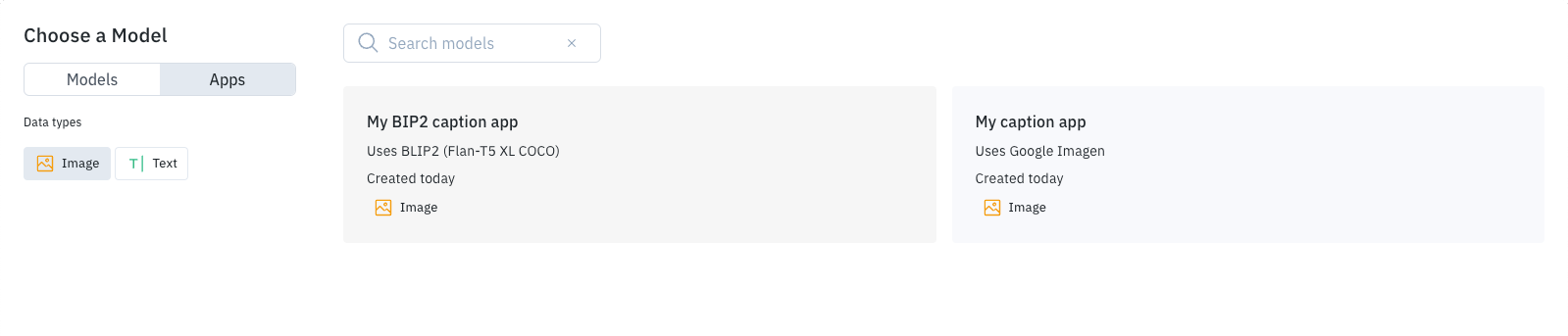 3. Select your Foundry app from the list.
4. From here, you can generate previews or submit the model run, just like any other Foundry model run.
## Run Foundry app using REST API
You can use the REST API to run a Foundry app, which is useful for triggering predictions from external systems. You can use REST endpoints to get predictions for:
* **Data rows** that are already in your Labelbox Catalog datasets.
* **Raw data assets** that are not stored in Labelbox.
The Labelbox app provides assistance in defining REST queries for common tasks. To get started:
1. Go to the **Model** section and open your Foundry app.
2. Select the **Developers** tab.
3. Select your Foundry app from the list.
4. From here, you can generate previews or submit the model run, just like any other Foundry model run.
## Run Foundry app using REST API
You can use the REST API to run a Foundry app, which is useful for triggering predictions from external systems. You can use REST endpoints to get predictions for:
* **Data rows** that are already in your Labelbox Catalog datasets.
* **Raw data assets** that are not stored in Labelbox.
The Labelbox app provides assistance in defining REST queries for common tasks. To get started:
1. Go to the **Model** section and open your Foundry app.
2. Select the **Developers** tab.
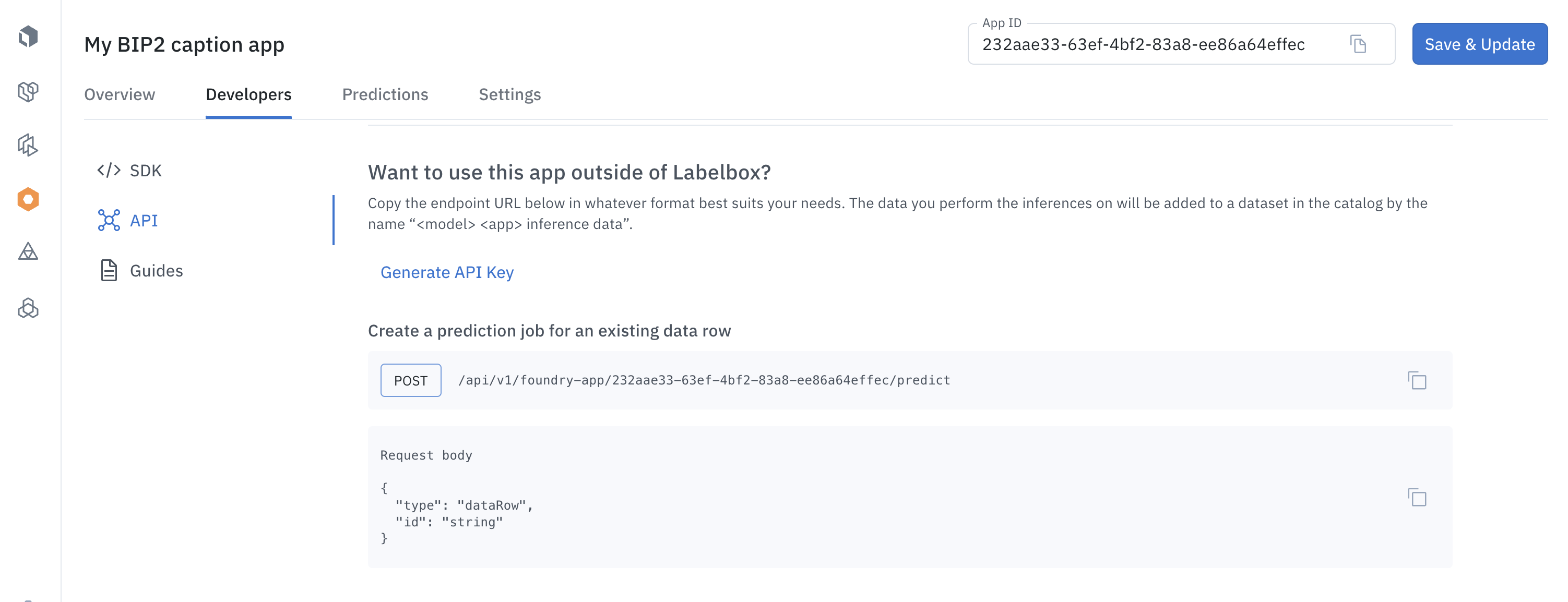 3. **Authentication**: If you have not already [generated an API](https://docs.labelbox.com/reference/create-api-key) key, select **Generate API key** and then follow the prompts. (Remember to save your API key in a safe place.)
4. **Choose your endpoint**: Select the endpoint that corresponds to the task you want to perform. The app provides sample request bodies to help you define your REST query.
### Predict an existing data row
To create a prediction job for a data row that is already in Labelbox, you'll need to specify the data row's ID in the request body. Note that `type` is set to `dataRow` and that `` specifies the appropriate value.
Example cURL request:
```shellscript theme={null}
curl --location 'https://app.labelbox.com/api/v1/foundry-app/:appId/predict' \
--header 'Content-Type: application/json' \
--header 'Authorization: Bearer ' \
--data '{
"type": "dataRow",
"id": ""
}'
```
### Predict a raw asset
You can also use Foundry apps to get predictions for raw data assets that are not stored in your Labelbox Catalog.
Example cURL request:
```shellscript Creating a prediction job on raw asset with url theme={null}
curl --location 'https://app.labelbox.com/api/v1/foundry-app/:appId/predict' \
--header 'Content-Type: application/json' \
--header 'Authorization: Bearer ' \
--data '{
"type": "text | image",
"url": "",
"createDataRow": "true",
"addToModelRun": "true"
}'
```
```curl Raw text content theme={null}
curl --location 'https://app.labelbox.com/api/v1/foundry-app/:appId/predict' \
--header 'Content-Type: application/json' \
--header 'Authorization: Bearer ' \
--data '{
"type": "text",
"text": "",
"createDataRow": "true",
"addToModelRun": "true"
}'
```
```curl Raw image content theme={null}
curl --location 'https://app.labelbox.com/api/v1/foundry-app/:appId/predict' \
--header 'Content-Type: application/json' \
--header 'Authorization: Bearer ' \
--data '{
"type": "image",
"base64": "",
"createDataRow": "true",
"addToModelRun": "true"
}'
```
Request body parameters:
| Parameter | Description |
| --------------- | -------------------------------------------------------------------------- |
| `type` | Set to either `text` or `image`. |
| `url` | A public URL pointing to the asset. |
| `text` | The text content of the asset. |
| `base64` | A Base64-encoded string that defines an image. |
| `createDataRow` | Set to `true` (default) to create a new data row. |
| `addToModelRun` | Set to `true` (default) to add the data row and prediction to a model run. |
When `createDataRow` and `addToModelRun` are true, the data row is added to a dataset named `App {Name} - inference data`, and the prediction is added to a model run named `App {Name} - inferences`, where `{Name}` is the name of your Foundry app.
Example response:
```json theme={null}
{
"id": "449f0b35-38c6-4fb1-bb47-144e958d08a4", <--- Job ID
"organizationId": "clah7z9b610d707wpfpf35066",
"userId": "clah7z9br10d807wpboxt920r",
"modelAppId": "bfe3927c-1f60-44ec-9114-c6a5f6ff0de2",
"dataRowId": "clqbkkn656s6s07975dhqnotz",
"status": "in_progress",
"createdAt": "2024-03-25T19:04:44.850617+00:00"
}
```
The `id` field includes the Job ID, which can be used to retrieve results when the job completes.
### Get prediction results
Prediction jobs run asynchronously, so you'll need to make a second query to get the results. This query requires the `Job ID` that was provided in the response to your initial request.
Example cURL request:
```shellscript theme={null}
curl --location 'https://app.labelbox.com/api/v1/foundry-app/prediction/:id' \
--header 'Authorization: Bearer '
```
The prediction results will be included in the response. You can also view the results in the **Predictions** tab of your Foundry app in the Labelbox UI.
Example response:
```json theme={null}
{
"id": "449f0b35-38c6-4fb1-bb47-144e958d08a4",
"organizationId": "clah7z9b610d707wpfpf35066",
"userId": "clah7z9br10d807wpboxt920r",
"modelAppId": "bfe3927c-1f60-44ec-9114-c6a5f6ff0de2",
"dataRowId": "clqbkkn656s6s07975dhqnotz",
"status": "success",
"annotations": [
{
"objects": [],
"relationships": [],
"classifications": [
{
"name": "describe_photo",
"feature_id": "af4e3cd30b904392a370559bf0a92064",
"text_answer": {
"content": "N/A"
}
},
{
"name": "has_people",
"feature_id": "69bda23bc9df4dcab86ace5c95cb6503",
"radio_answer": {
"name": "no",
"feature_id": "c0c57d73d3ba4884af88357bf6c3a025"
}
},
{
"name": "has_chairs",
"feature_id": "88f84d30ea4745be98a66baa23d685ed",
"radio_answer": {
"name": "no",
"feature_id": "289e63b18ff746c899a1eb6c0c358fe3"
}
}
]
}
],
"price": 0,
"createdAt": "2024-03-25T19:04:44.850617+00:00",
"finishedAt": "2024-03-25T19:05:01.704949+00:00"
}
```
### Find a prediction job
You can search for previous prediction jobs using the following filters:
* **Model App ID**: The ID of your Foundry app.
* **Job status**: `in_progress`, `success`, `error`, `canceled`, or `retried`.
* **Creation date**: A range of dates in ISO 8601 format.
```shellscript Search for a prediction job by model id theme={null}
curl --location 'https://app.labelbox.com/api/v1/foundry-app/:appId/predictions' \
--header 'Content-Type: application/json' \
--header 'Authorization: Bearer ' \
--data '{
"filters": {
"modelRunId": "string",
},
"pagination": {
"limit": "number",
"cursor": "string"
}
}'
```
```curl Search for a prediction job by status theme={null}
curl --location 'https://app.labelbox.com/api/v1/foundry-app/:appId/predictions' \
--header 'Content-Type: application/json' \
--header 'Authorization: Bearer ' \
--data '{
"filters": {
"status": "in_progress|success|error|canceled|retried",
},
"pagination": {
"limit": "number",
"cursor": "string"
}
}'
```
```curl Search for a prediction job by creation date theme={null}
curl --location 'https://app.labelbox.com/api/v1/foundry-app/:appId/predictions' \
--header 'Content-Type: application/json' \
--header 'Authorization: Bearer ' \
--data '{
"filters": {
"createdFrom": "string (ISO8601 date format)",
"createdTo": "string (ISO8601 date format)"
},
"pagination": {
"limit": "number",
"cursor": "string"
}
}'
```
## Run a Foundry app using the Python SDK
For more advanced workflows, you can use the Python SDK to run your Foundry apps and process the results. For example, you could write a script that runs an app and then sends the predictions to be annotated by a human reviewer.
The **Developers** tab of your Foundry app in the Labelbox UI provides a sample Python script that shows how to:
1. Select a set of data rows.
2. Run a Foundry app on those data rows.
3. Retrieve the prediction results.
4. Send the prediction results to be annotated.
This sample script is a template and will need to be customized with the specific IDs for your project, which you can find in the Labelbox app.
3. **Authentication**: If you have not already [generated an API](https://docs.labelbox.com/reference/create-api-key) key, select **Generate API key** and then follow the prompts. (Remember to save your API key in a safe place.)
4. **Choose your endpoint**: Select the endpoint that corresponds to the task you want to perform. The app provides sample request bodies to help you define your REST query.
### Predict an existing data row
To create a prediction job for a data row that is already in Labelbox, you'll need to specify the data row's ID in the request body. Note that `type` is set to `dataRow` and that `` specifies the appropriate value.
Example cURL request:
```shellscript theme={null}
curl --location 'https://app.labelbox.com/api/v1/foundry-app/:appId/predict' \
--header 'Content-Type: application/json' \
--header 'Authorization: Bearer ' \
--data '{
"type": "dataRow",
"id": ""
}'
```
### Predict a raw asset
You can also use Foundry apps to get predictions for raw data assets that are not stored in your Labelbox Catalog.
Example cURL request:
```shellscript Creating a prediction job on raw asset with url theme={null}
curl --location 'https://app.labelbox.com/api/v1/foundry-app/:appId/predict' \
--header 'Content-Type: application/json' \
--header 'Authorization: Bearer ' \
--data '{
"type": "text | image",
"url": "",
"createDataRow": "true",
"addToModelRun": "true"
}'
```
```curl Raw text content theme={null}
curl --location 'https://app.labelbox.com/api/v1/foundry-app/:appId/predict' \
--header 'Content-Type: application/json' \
--header 'Authorization: Bearer ' \
--data '{
"type": "text",
"text": "",
"createDataRow": "true",
"addToModelRun": "true"
}'
```
```curl Raw image content theme={null}
curl --location 'https://app.labelbox.com/api/v1/foundry-app/:appId/predict' \
--header 'Content-Type: application/json' \
--header 'Authorization: Bearer ' \
--data '{
"type": "image",
"base64": "",
"createDataRow": "true",
"addToModelRun": "true"
}'
```
Request body parameters:
| Parameter | Description |
| --------------- | -------------------------------------------------------------------------- |
| `type` | Set to either `text` or `image`. |
| `url` | A public URL pointing to the asset. |
| `text` | The text content of the asset. |
| `base64` | A Base64-encoded string that defines an image. |
| `createDataRow` | Set to `true` (default) to create a new data row. |
| `addToModelRun` | Set to `true` (default) to add the data row and prediction to a model run. |
When `createDataRow` and `addToModelRun` are true, the data row is added to a dataset named `App {Name} - inference data`, and the prediction is added to a model run named `App {Name} - inferences`, where `{Name}` is the name of your Foundry app.
Example response:
```json theme={null}
{
"id": "449f0b35-38c6-4fb1-bb47-144e958d08a4", <--- Job ID
"organizationId": "clah7z9b610d707wpfpf35066",
"userId": "clah7z9br10d807wpboxt920r",
"modelAppId": "bfe3927c-1f60-44ec-9114-c6a5f6ff0de2",
"dataRowId": "clqbkkn656s6s07975dhqnotz",
"status": "in_progress",
"createdAt": "2024-03-25T19:04:44.850617+00:00"
}
```
The `id` field includes the Job ID, which can be used to retrieve results when the job completes.
### Get prediction results
Prediction jobs run asynchronously, so you'll need to make a second query to get the results. This query requires the `Job ID` that was provided in the response to your initial request.
Example cURL request:
```shellscript theme={null}
curl --location 'https://app.labelbox.com/api/v1/foundry-app/prediction/:id' \
--header 'Authorization: Bearer '
```
The prediction results will be included in the response. You can also view the results in the **Predictions** tab of your Foundry app in the Labelbox UI.
Example response:
```json theme={null}
{
"id": "449f0b35-38c6-4fb1-bb47-144e958d08a4",
"organizationId": "clah7z9b610d707wpfpf35066",
"userId": "clah7z9br10d807wpboxt920r",
"modelAppId": "bfe3927c-1f60-44ec-9114-c6a5f6ff0de2",
"dataRowId": "clqbkkn656s6s07975dhqnotz",
"status": "success",
"annotations": [
{
"objects": [],
"relationships": [],
"classifications": [
{
"name": "describe_photo",
"feature_id": "af4e3cd30b904392a370559bf0a92064",
"text_answer": {
"content": "N/A"
}
},
{
"name": "has_people",
"feature_id": "69bda23bc9df4dcab86ace5c95cb6503",
"radio_answer": {
"name": "no",
"feature_id": "c0c57d73d3ba4884af88357bf6c3a025"
}
},
{
"name": "has_chairs",
"feature_id": "88f84d30ea4745be98a66baa23d685ed",
"radio_answer": {
"name": "no",
"feature_id": "289e63b18ff746c899a1eb6c0c358fe3"
}
}
]
}
],
"price": 0,
"createdAt": "2024-03-25T19:04:44.850617+00:00",
"finishedAt": "2024-03-25T19:05:01.704949+00:00"
}
```
### Find a prediction job
You can search for previous prediction jobs using the following filters:
* **Model App ID**: The ID of your Foundry app.
* **Job status**: `in_progress`, `success`, `error`, `canceled`, or `retried`.
* **Creation date**: A range of dates in ISO 8601 format.
```shellscript Search for a prediction job by model id theme={null}
curl --location 'https://app.labelbox.com/api/v1/foundry-app/:appId/predictions' \
--header 'Content-Type: application/json' \
--header 'Authorization: Bearer ' \
--data '{
"filters": {
"modelRunId": "string",
},
"pagination": {
"limit": "number",
"cursor": "string"
}
}'
```
```curl Search for a prediction job by status theme={null}
curl --location 'https://app.labelbox.com/api/v1/foundry-app/:appId/predictions' \
--header 'Content-Type: application/json' \
--header 'Authorization: Bearer ' \
--data '{
"filters": {
"status": "in_progress|success|error|canceled|retried",
},
"pagination": {
"limit": "number",
"cursor": "string"
}
}'
```
```curl Search for a prediction job by creation date theme={null}
curl --location 'https://app.labelbox.com/api/v1/foundry-app/:appId/predictions' \
--header 'Content-Type: application/json' \
--header 'Authorization: Bearer ' \
--data '{
"filters": {
"createdFrom": "string (ISO8601 date format)",
"createdTo": "string (ISO8601 date format)"
},
"pagination": {
"limit": "number",
"cursor": "string"
}
}'
```
## Run a Foundry app using the Python SDK
For more advanced workflows, you can use the Python SDK to run your Foundry apps and process the results. For example, you could write a script that runs an app and then sends the predictions to be annotated by a human reviewer.
The **Developers** tab of your Foundry app in the Labelbox UI provides a sample Python script that shows how to:
1. Select a set of data rows.
2. Run a Foundry app on those data rows.
3. Retrieve the prediction results.
4. Send the prediction results to be annotated.
This sample script is a template and will need to be customized with the specific IDs for your project, which you can find in the Labelbox app.